From a 25 m pool to a long open-water swim, see how your pace, heart rate and stroke rate changed through the session. Then put the swim back into your training week: swimming contributes to volume and, with usable heart-rate data, the same training-load history as your rides and runs.
Real EffortSignal web screenshots with demo data: a 3.8 km open-water swim on 22 August, a 2.5 km pool session on 23 August, and a fictional training history. Activity analysis and training load are included in Free and Pro.
See the effort behind your pace
Open a swim from Activities or Calendar. Overview keeps heart rate above swim pace so changes in effort and speed are easy to compare. Pace is shown per 100 m, while the activity summary brings duration, distance, average pace, heart rate and stroke rate together when the recording supports them.
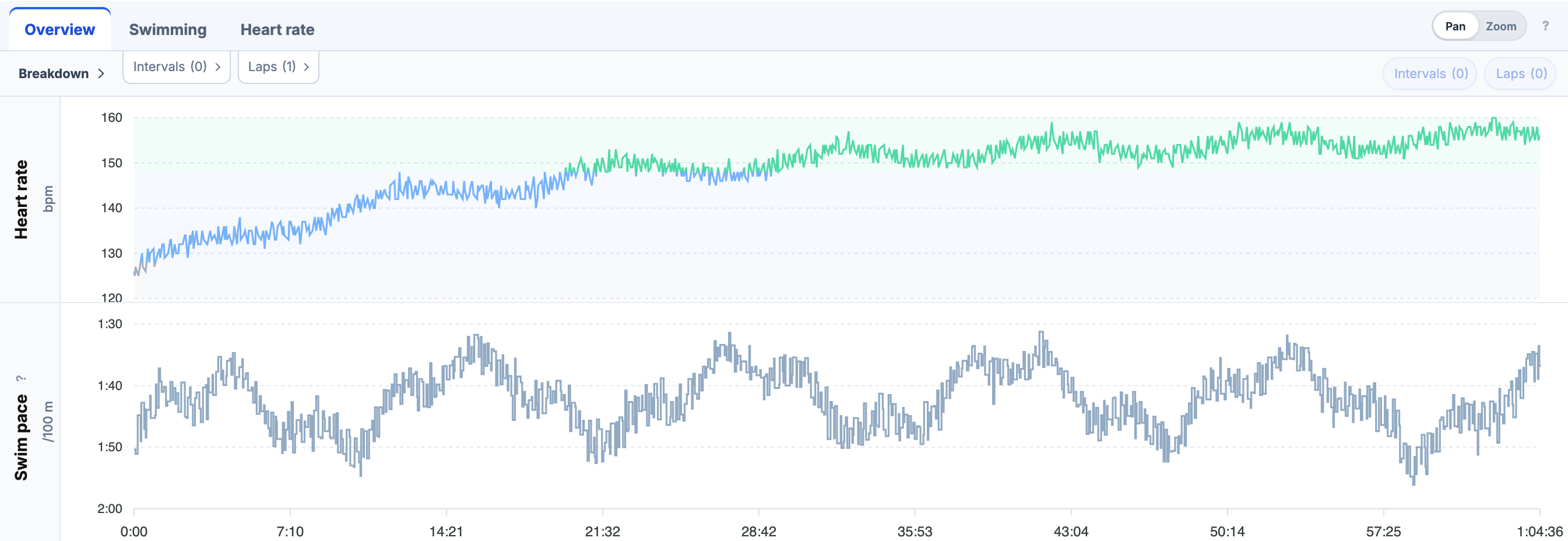
The Swimming tab adds stroke rate and the swim pace curve. Heart rate provides the available HR analysis, including the duration curve. Use chart settings to choose the recorded channels you want to see.
Pool lengths and open-water distance
In the pool, expand a recorded lap to inspect its individual lengths: distance, swim time, pace, style, stroke count and stroke rate where available. The 23 August example contains 100 lengths in a 25 m pool, grouped into four recorded laps. Explore Pool Swimming for the lap-to-length workflow and swim interval metrics.
In open water, follow the GPS route, pace and stroke rate through a continuous swim. Best efforts use the recorded distance stream, so their accuracy follows that recording. Open-water swims do not need pool lengths to have useful analytics. Explore Open Water Swimming for the map, charts and distance-based efforts.
Both environments support activity best efforts over 50, 100, 200, 400, 800 and 1500 m when enough suitable data exists. Show on charts highlights the chosen effort on the timeline without changing your zoom. These are the best efforts within that activity, rather than an all-time personal-record table.
Triathletes: your swimming counts too
Swimming contributes to the same daily training load as cycling and running. A swim with sufficient heart-rate coverage produces TRIMP, which feeds Fitness (CTL), Fatigue (ATL) and Form (TSB). You do not have to add a separate manual load just because the session happened in water.
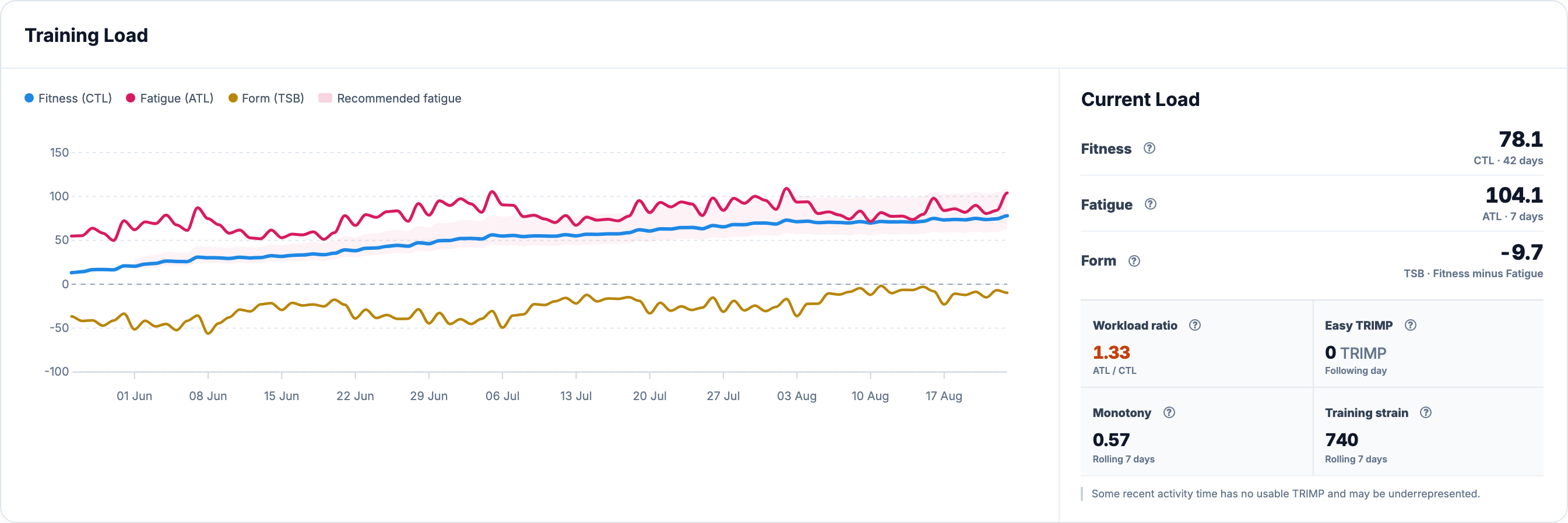
TRIMP needs at least 90% heart-rate coverage and applicable resting and maximum HR settings. Missing or sparse HR is not treated as proof of an easy swim. Known load from other activities still contributes, and the app identifies incomplete coverage. Power-based PSS remains separate; it does not automatically replace missing TRIMP. See Training Load for the calculation and history limits.
Track swimming volume separately
In Dashboard → Training Volume, select Swimming and choose weeks or months. Duration shows elapsed activity time; TRIMP shows the available heart-rate load. Return to All to see the combined training week. A swim can contribute recorded duration even when its HR data cannot support TRIMP.
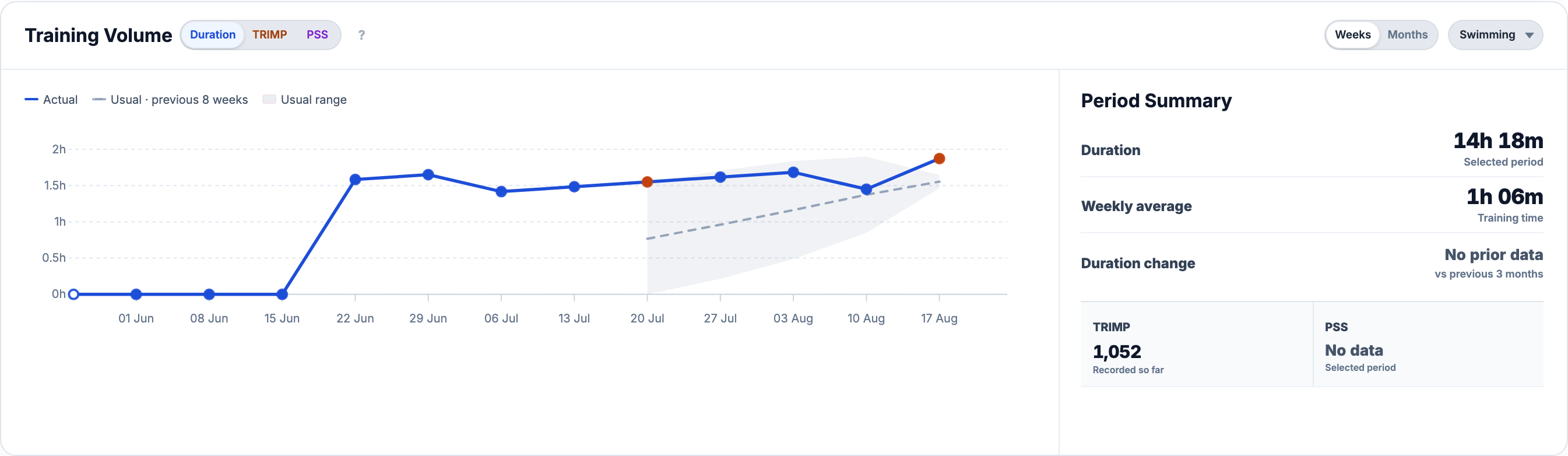
The weekly usual range uses the preceding eight complete weeks. A week in progress remains partial. For distance totals and a broader view across periods, use Progress → Volume and load. Training Volume explains the period controls and baseline.
Start with the data your device recorded
Import a FIT file or use a supported integration. Recorded lengths provide pool detail; GPS and distance provide open-water context; cadence supplies stroke rate. No single device is required to supply every channel. Missing style, strokes or HR remains missing rather than being presented as a measured value.
Choose the detailed guide for your next session: Pool Swimming or Open Water Swimming.
All Pro features are free through January 31, 2027. No credit card or automatic charges. After Early Access, keep using Free or choose Pro. See Free and Pro plans.