See a pool session at three scales: the whole workout, its recorded laps, and each length inside a lap. Compare pace and strokes, highlight a length on the charts, or save it as an interval for a closer look.
Screenshots show the real web app with a demo session from 23 August: 2,500 m in a 25 m pool, with four recorded laps and 100 lengths. Activity analysis is included in Free and Pro.
Review the structure of your pool session
Open the activity, then choose Laps beside Breakdown. Each lap keeps its own row, with distance, timing and available metrics. In this example the laps cover 500 m, 800 m, 800 m and 400 m. The Lengths button reveals the pool lengths belonging to that lap.
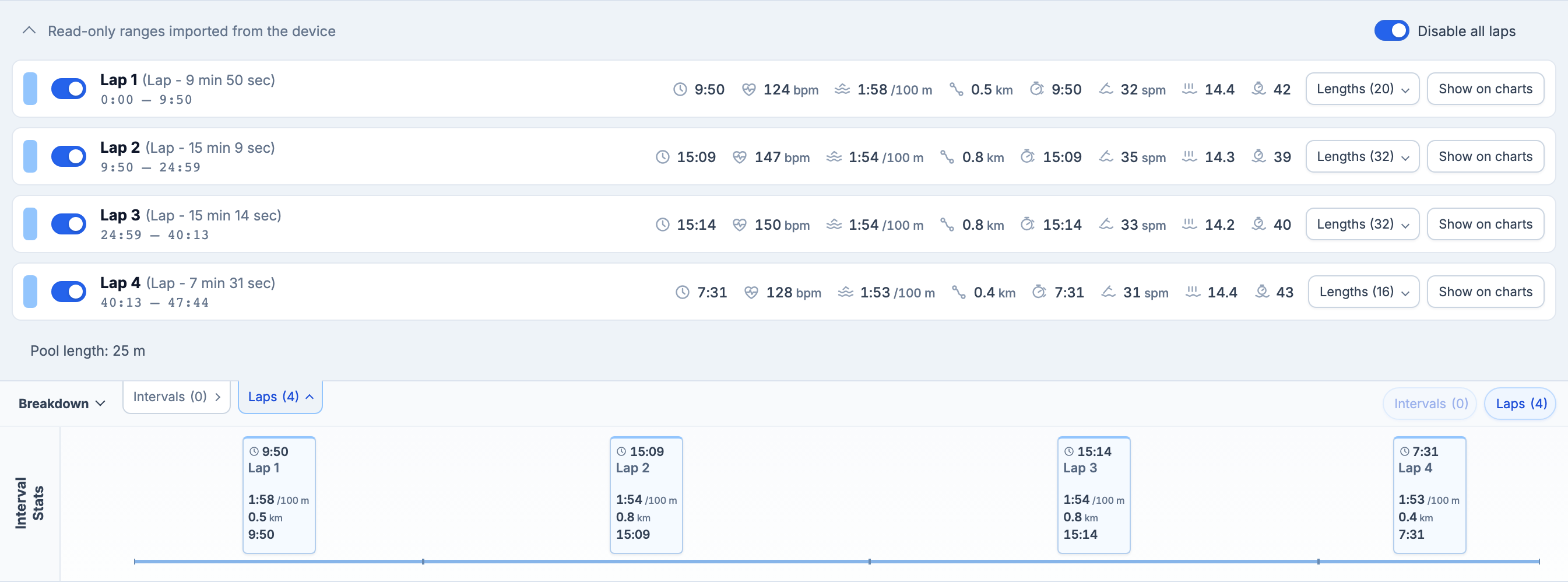
Recorded laps and saved intervals are separate. This session has four laps; saved intervals are the ranges you choose to keep for closer analysis.
Inspect pace and strokes for each length
Expand Lengths (20) in the first lap. The inset table shows each length’s distance, swim time, pace per 100 m, stroke style, stroke count and stroke rate when those fields are available. The example begins with 25 m in 27 seconds, 15 strokes and 33 spm, recorded as freestyle.
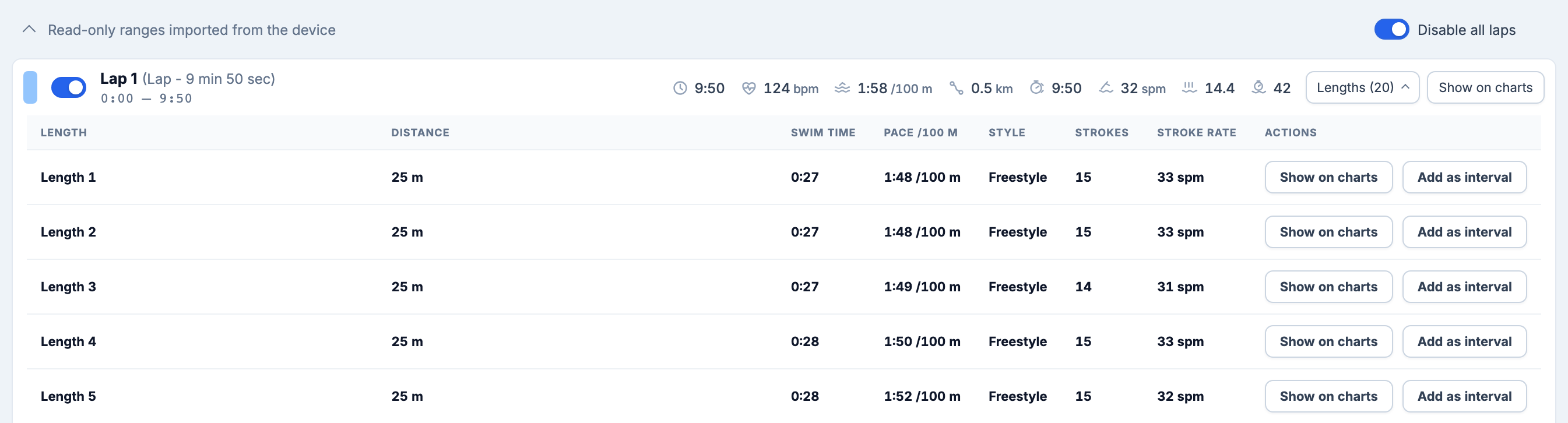
Show on charts highlights that length on the charts without changing your zoom. Add as interval saves its exact bounds using a name such as Lap 1 - Length 1. When the activity contains only one lap, the name is simply Length 1. Open the saved interval to inspect its metrics.
Compare your swim intervals
For a range containing complete recorded pool lengths, the interval metrics can include distance, swim time, pace, length count, stroke count, stroke rate, strokes per length, SWOLF and stroke style, alongside available heart-rate metrics. SWOLF combines swim time in seconds and strokes per length; compare it in the context of the same pool length and stroke style.
These calculations use complete lengths inside the selected bounds. A range cutting through a length cannot supply an exact whole-length result. Missing recorded fields stay unavailable. Interval Analysis explains saved intervals and the shared charts.
Find your fastest sustained pool efforts
In Swimming, the pace curve and table show the fastest available 50, 100, 200, 400, 800 and 1500 m efforts within this activity. Pool results use consecutive whole recorded lengths and include any rest inside the effort.
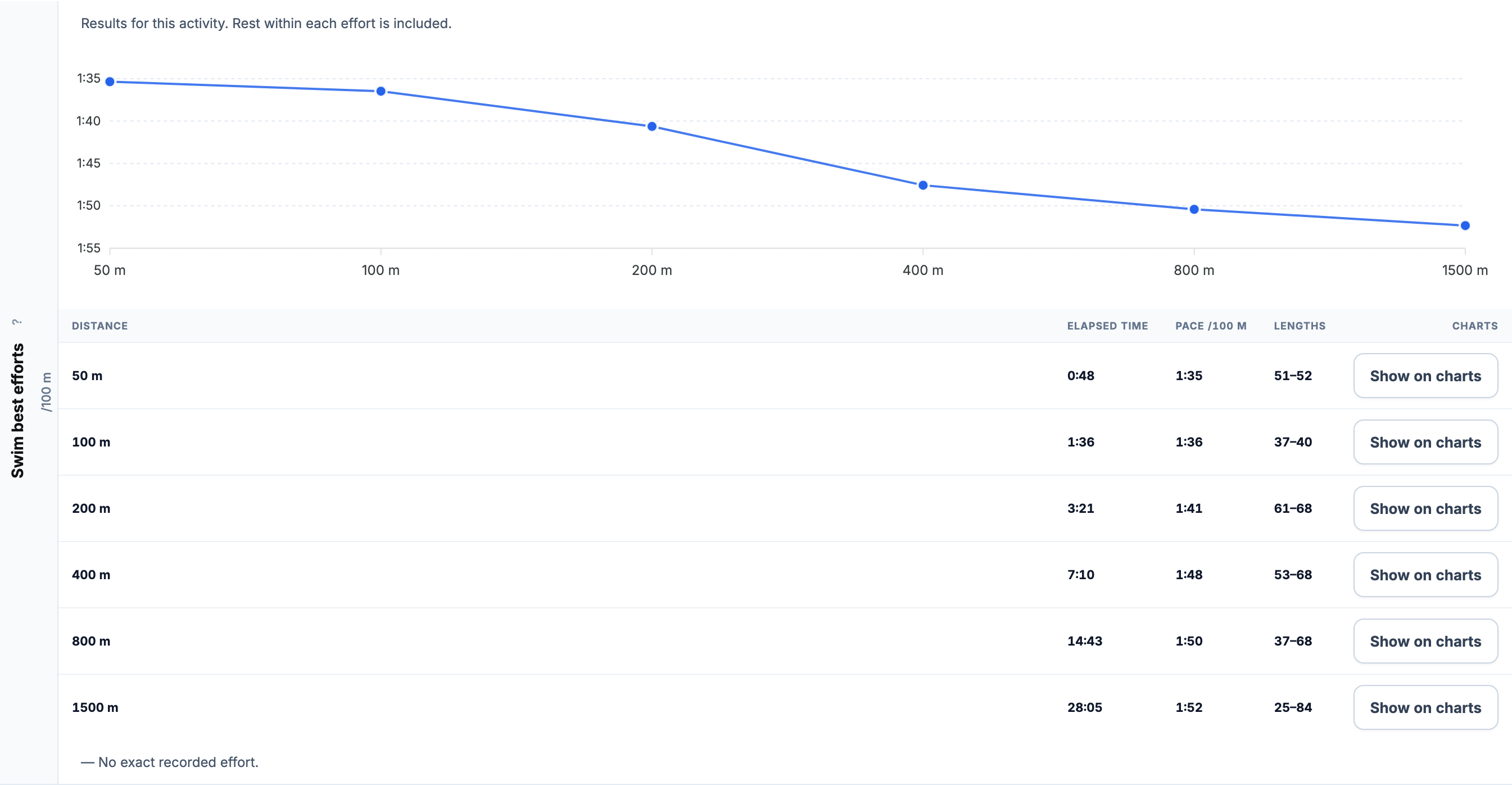
The table identifies the source lengths. Choose Show on charts to locate an effort in the session. A dash means there is no exact recorded effort for that distance; the app does not invent extra lengths or extrapolate a longer swim.
Pool time counts in your training week
Pool swims contribute to recorded training volume. With at least 90% HR coverage and applicable HR settings, they also contribute TRIMP to Fitness, Fatigue and Form, alongside cycling, running and open-water swimming. This example’s pool HR stream is too sparse for TRIMP, so its duration is counted while its load is marked incomplete.
Read Swimming Analytics for the combined training picture, or Open Water Swimming for distance and GPS analysis away from the pool.
All Pro features are free through January 31, 2027. No credit card or automatic charges. After Early Access, keep using Free or choose Pro. See Free and Pro plans.